


PlayStation App
3.568.46K Reviews
App Specs
- Version
- 26.8.0
- Updated On
- License
- Free
- Downloads
- 100,000,000+
- Developer
- PlayStation Mobile Inc.
- Categories
- Entertainment
- Platform
- Android, iOS
Screenshots
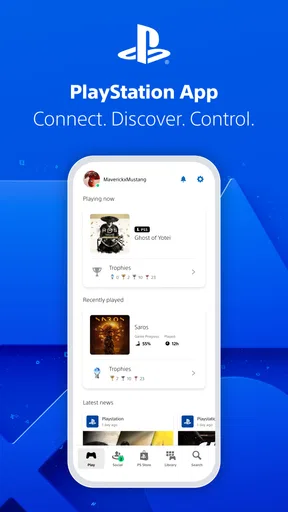
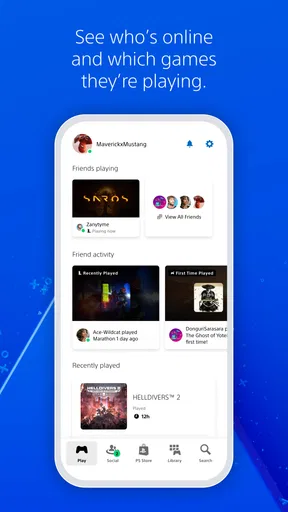
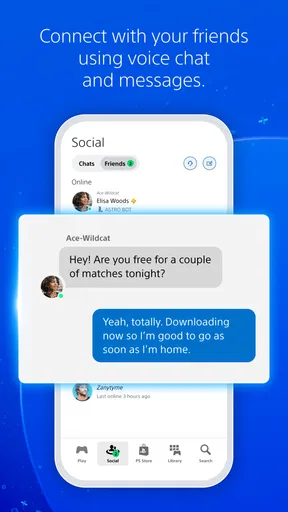
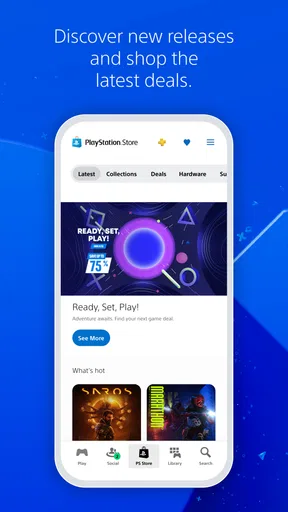
 Analysis by AppCompare
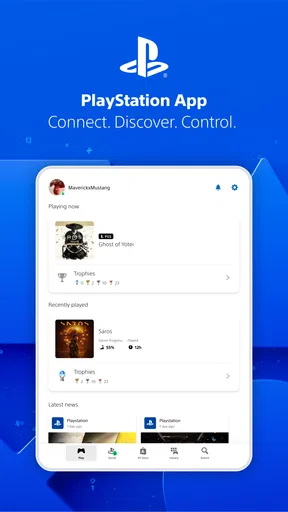
Hey there! If you're a PlayStation enthusiast like me, you’ll definitely want to check out the PlayStation App. It's like having a piece of your console in your pocket, letting you stay connected to your gaming world even when you're away from your trusty PS5 or PS4. I took it for a spin and here's what I think.
Why the First Week Feels Useful
The appeal shows up quickly if your phone is already where you manage messages and plans. Instead of waiting until you are in front of the console to see whether friends are around, you can check in while you have a spare moment. That makes the app feel less like a second gaming device and more like a handy remote window into the PlayStation account you already use.
For a new user, the best early test is simple: sign in, find the friends and conversations you actually use, and try one task you would otherwise postpone until you get home. If that saves a little time, the app has a clear role. If you rarely coordinate play or manage your console from elsewhere, its novelty may wear off quickly. It is most convincing when it solves a small, recurring inconvenience rather than when you browse every screen just because it is new.
First Impressions and Setup
Setting up the PlayStation App is a breeze. Just download it from your favorite app store, log in with your PlayStation Network account, and voilà, you're in. The interface is sleek and user-friendly, with that classic PlayStation vibe. Everything is laid out nicely, so you don’t end up feeling lost in a sea of options. Plus, the dark mode feature is a blessing for those late-night scrolls.
Connecting with Friends
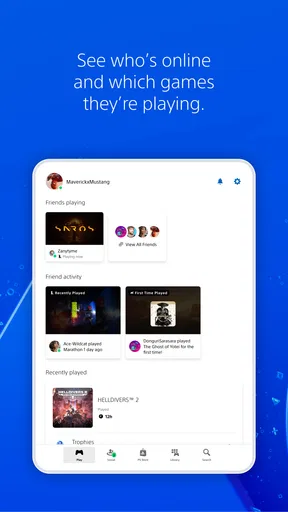
One of the coolest things about the app is how it keeps you connected with your gaming circle. You can check who's online, join parties, and even voice chat. Yup, you heard it right! Voice chatting through the app works surprisingly well. I was able to chat with my squad without any hiccups, making it super handy for coordinating those intense gaming sessions.
This is where it can be more useful than relying only on console menus: you can sort out a plan while you are away from your setup, then sit down with the conversation already moving. A practical habit is to keep notifications focused on the people and chats you care about. That way, the app supports coordination without turning every friend request or message into an interruption. If your group already uses another chat service and does not want to switch, though, the PlayStation app is unlikely to replace that routine by itself.
Remote Downloads and Game Library
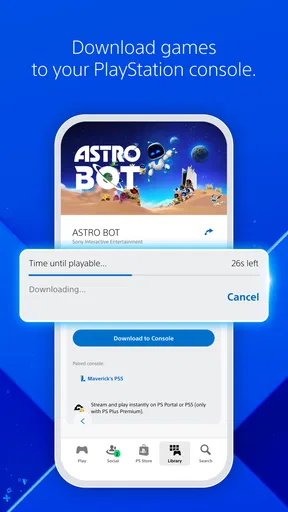
Imagine this: you're stuck at work, and your friend tells you about this awesome new game. You can hop onto the app, browse the PlayStation Store, and start downloading it remotely to your console. By the time you get home, it's ready to play. The app also lets you browse your game library and check for updates, making it a nifty tool for managing your games on the go.
Worth Reading Before You Choose

Flipboard Shows What News Apps Must Do Beyond the Feed

Switching to Android Auto Means Rethinking Your Driving Routine

Google Calendar Makes a Crowded Week Easier to Manage

Ludo King Makes the Most of the Minutes Between Plans

Baby Panda World Brings Quick Play to Modern Phones, but Its Game Library Feels Busy

ESPN’s Live Game View Makes Following Close Games Easier
The strongest use case is planning ahead, not browsing endlessly. If you know what you want to play before leaving work or school, starting a download remotely can turn waiting time into play time. It is worth checking that the right console is selected and available to receive the task; the phone can request an action, but it cannot make a console that is unavailable respond. I also find the library more useful as a quick reminder of what I own than as a substitute for the console’s full browsing experience.
Compared with opening the store on the console, the phone is convenient when you are away or just want to check something briefly. For a long shopping session, however, a larger screen and controller may be more comfortable. I would use the app to narrow down a choice or queue a download, then make the final decision on the device where I intend to play.
Stay in the Loop with Notifications
The app keeps you updated with notifications about game alerts, friend requests, and messages. It’s like having a personal assistant who knows all your gaming preferences. I found this feature particularly useful to keep track of sales or special events happening in the PlayStation universe.
Notifications are also the part I would tune early rather than accept as they arrive. A phone that already handles work, family and other social apps can become noisy fast. Keeping only the alerts that help you act—such as a message from your regular group—makes the app feel like a tool instead of another feed demanding attention. If you prefer to check updates on your own schedule, turning down alerts does not remove the app’s basic value; it simply makes it less intrusive.
Share and Socialize
Sharing your gaming achievements has never been easier. You can share screenshots, trophies, and more with your friends directly from the app. It’s a fun way to boast about that platinum trophy you finally earned or just to keep the community spirit alive.
This works best for players who enjoy talking about what they are playing, not just collecting updates privately. A quick screenshot can give friends something concrete to react to, while trophies can make it easy to pick up a conversation after a session. The trade-off is that social sharing adds little for someone who plays alone or prefers to keep gaming activity separate from phone conversations. I would treat it as an optional extra, not a reason to install the app on its own.
What Changes After the Novelty
After the first few days, I would judge the app by whether it earns a place in an ordinary routine. A useful pattern might be checking a group message during a commute, looking at the library before deciding what to play, and starting a download before heading home. Each action is modest, but together they can make the console easier to pick up when free time is short. If none of those situations come up for you, there is no need to force a daily habit.
The app is free, and its broad reach is reflected in more than 100 million installs. It has an average rating of 3.6 from around 1.1 million ratings, with roughly 68,000 written reviews. Those figures suggest a widely used companion with mixed experiences, which matches my own view: its appeal depends heavily on how much you use PlayStation features away from the console. PlayStation Mobile Inc. develops it, and it sits in the entertainment category rather than trying to be a general-purpose gaming platform.
For a realistic example, imagine deciding on a game during a lunch break because you know you will have an evening free. You can check the library, message a friend to see if they are available, and arrange a download before leaving. At home, the console remains the place to play, but the preparation has already happened. That small handoff between phone and console is the app’s lasting advantage; it does not need to replace the console to justify being installed.
Interface, Performance, and Maintenance
While the app is fairly intuitive, there are moments when it feels a tad sluggish, especially when navigating through the store. It's not a deal-breaker, but something to be aware of. However, the overall performance is smooth, and updates seem to keep improving the experience.
The maintenance burden is fairly light: keep the app available, sign in when needed, and adjust its alerts if they become distracting. The main ongoing friction is not complicated upkeep but occasional waiting and the fact that a phone screen is less suited to browsing a large catalog. If the store feels slow during a particular visit, I would avoid repeatedly tapping through pages and instead return to the task later or continue on the console. That is a small workaround, but it keeps a sluggish moment from spoiling the whole experience.
The current version is 26.5.0, and the app is intended for devices running Android 8.0 or later. Its age rating is Teen. Those details matter when deciding whether it can be installed on a particular device or used by someone in the household, but the more important practical question is whether that person has a PlayStation account and a console they want to manage. Without that connection, most of the app’s useful functions have little reason to stay in regular use.
Who Should Keep It—and Who Can Skip It
I would recommend it to someone who regularly plays on a PlayStation console, coordinates sessions with friends, or likes to get downloads and plans sorted before sitting down. It is especially handy if your gaming time comes in short windows: a few minutes on your phone can help you use the longer window at home for actually playing. The app also makes sense for players who want messages and console-related activity in one familiar place instead of waiting to check everything on the television.
I would not push it on someone who rarely plays, does not use PlayStation social features, or prefers to do every account and store task directly on the console. It is also not the right replacement for a general messaging app if your friends do not use PlayStation chat. In those cases, the console interface or the group’s existing chat tool is simpler, and installing another app may create more clutter than convenience.
One question people often have is whether the phone can take the place of the console. In my experience, it is better understood as a companion: it helps with communication, browsing and remote preparation, while the console remains central to playing. Another reasonable question is whether notifications are essential. They are not; you can use the app selectively and check it when convenient. The best setup is the one that keeps useful conversations visible without making gaming alerts compete with everything else on your phone.
Long-Term Verdict
All in all, the PlayStation App is a must-have for any PlayStation gamer. It brings a slice of the console experience to your mobile device, keeping you connected and engaged with the gaming community. Whether you’re managing downloads, chatting with friends, or just keeping up with gaming news, this app has got your back. If you haven't tried it yet, give it a download and see how it fits into your gaming lifestyle. Happy gaming!
That recommendation comes with a condition: I think it earns lasting space when at least one of its jobs—planning downloads, checking the library, or staying in touch with your regular players—comes up often. It does not need to become something you open every day. A few useful visits each week can be enough, while a player who handles everything at the console may find it redundant. For me, its value is practical rather than essential: it smooths the edges around gaming, but the console is still the reason to play.
Pros
- Seamless integration with PlayStation Network.
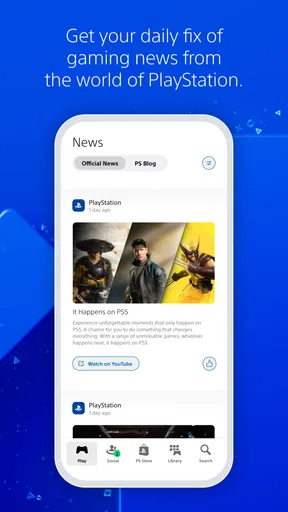
- Easy access to game news and updates.
- Remote console management is convenient.
- Connect with friends via voice chat.
- Intuitive and user-friendly interface.
Cons
- Limited customization options.
- Occasional connectivity issues.
- Notifications can be overwhelming.
- Some features require PS Plus.
- Heavy battery usage on older devices.
FAQs for PlayStation App
What features does the PlayStation App offer?
The PlayStation App allows users to connect with their PlayStation network, check online status of friends, send messages, and browse the PlayStation Store. It also lets you manage game downloads remotely and access game notifications. Additionally, you can use it as a second screen for some games and receive the latest news about your favorite titles.
Is the PlayStation App free to use?
Yes, the PlayStation App is free to download and use. However, some features might require a PlayStation Plus subscription, such as online multiplayer gaming. The app itself doesn’t incur any additional costs, making it a valuable tool for enhancing your PlayStation experience without paying extra.
Can I use the PlayStation App to chat with friends?
Absolutely! The PlayStation App allows you to send messages to your friends on the PlayStation Network. You can join group chats, send voice messages, and even share images. This feature helps you stay connected and coordinate gaming sessions with your friends, all from your mobile device.
Is the PlayStation App compatible with all PlayStation consoles?
The app is primarily designed to work with PlayStation 4 and PlayStation 5 consoles. While it also offers some functionality with the PlayStation 3, the features are limited. It's advisable to use the app in conjunction with the latest PlayStation consoles to take full advantage of its capabilities.
How secure is my account on the PlayStation App?
The PlayStation App uses secure protocols to protect your account information. Sony recommends enabling two-factor authentication to add an extra layer of security. This ensures that even if someone has your password, they cannot access your account without the secondary verification method, keeping your data safe and secure.


